EVERYTHING BUILT IN. YOURS TO SWITCH.

Your trading
platform.
Your name.

A complete trading-technology business under your own brand: strategy marketplace, backtests, Live Auto on your clients’ own brokers, a blog, an affiliate program and your own payment gateway. All of it is built in, and most of it is on the day you sign up.

You switch anything on or off yourself, in the Partner Studio. No approval from anyone.

15 days free, Live Auto includedNo setup fee or running fee in the trialFor businesses in India and the US
MAKE IT YOURSA tour of your clients’ platform
.strategydesk.app

Use 4 to 26 lowercase letters, numbers or single hyphens. Start with a letter and end with a letter or number.
northstar.strategydesk.appPreview

A preview in your browser. Nothing is reserved or sent.

Northstar is a sample brand. Figures are illustrative.

Built on Tradetron.

Your website. Your address. Your brand. Your clients. Your payments.

Every feature included. You decide what’s on.

WHAT YOU GET

Everything is included.
Nothing is an add-on.

Every partner gets the same full platform, with most of it on from day one. The full list of 84 features is on the features page; here are the main ones.

The price. Free for 15 days. Then ₹2,50,000 one-time setup and ₹15 per running strategy per day, plus GST. No revenue share. Pricing

The trial. Sign-up goes straight into it, with most features on, Live Auto included. No setup fee and no running fee until you convert. Trial questions

Your clients. They are yours: your brand, your address, your plans, and their payments go to your own payment account. Who owns them

THE FEATURE TOUR

What you can do with it.
Why it matters.

Each feature with what it lets you do, why it matters for your business, and a real screenshot of the product. Screens show practice accounts and sample brands; your platform shows your own name.

01 · CONTROL

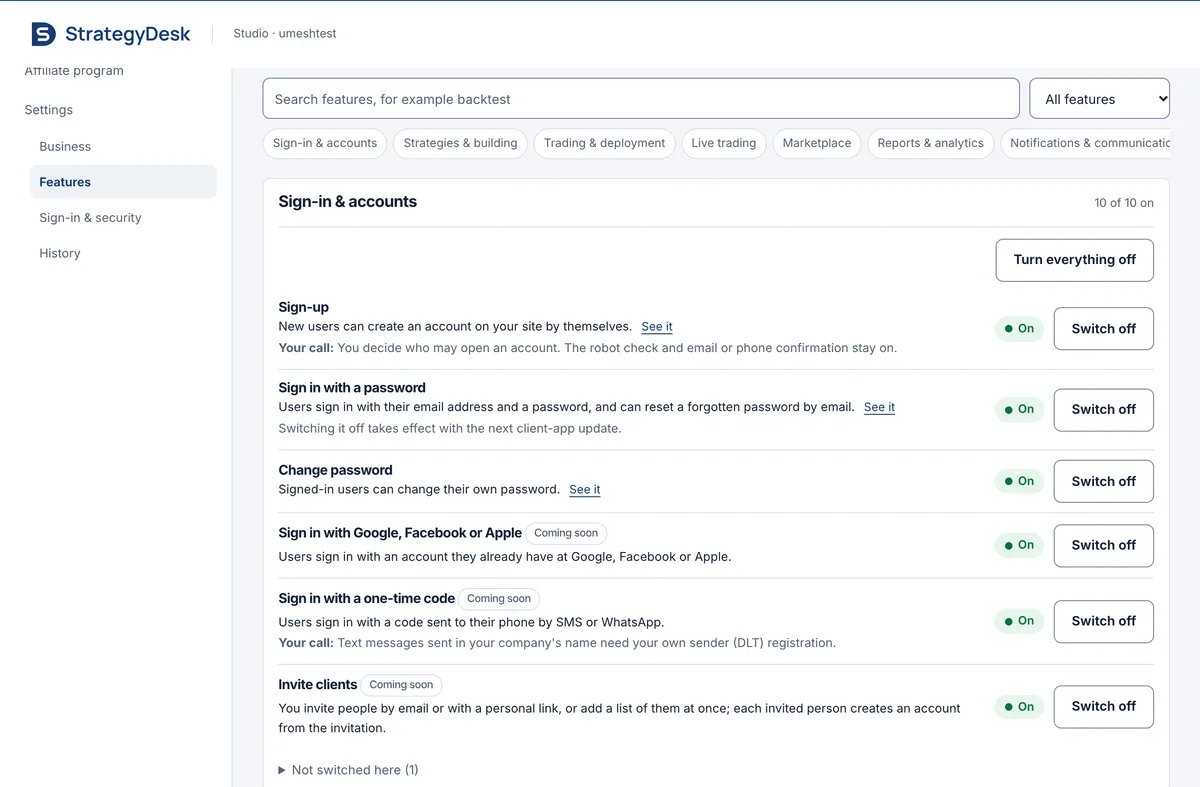
The Partner Studio: your hands-off control panel

You run the business; nobody at Tradetron decides for you. Most features are already on, and you switch any of them on or off for your clients in one click. The change applies at once and is recorded in your site’s history.

  • Switch any feature, or a whole category, on or off
  • Set your brand, pages, address, plans and prices
  • See your clients, their running strategies and your sales
  • No ticket, no request, no approval for product features

Included from day one

The Studio’s Features screen: search, category filters, and feature cards each with On and Switch off.
Partner Studio, Features screen: each feature is a switch for the partner. Captured 4 Oct 2026 from a live trial Studio.

02 · YOUR SITE

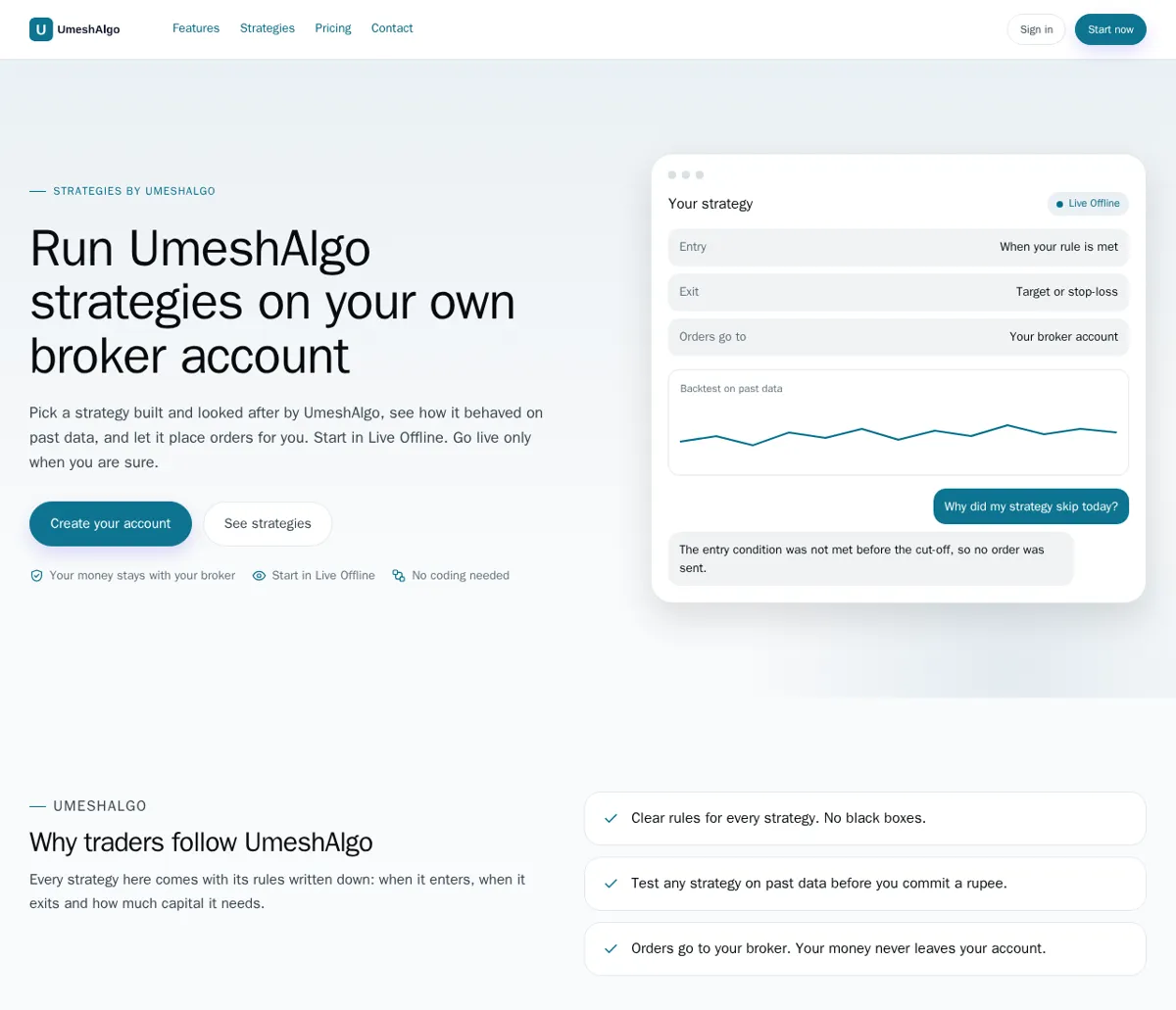
A real website on day one, not a blank page

You will spend money sending people to your site. It opens with your name, your logo and your colours, a home page, features, strategies and pricing, ready for the first visitor.

  • Your client site and your Studio, each on its own address
  • Start pages from templates and edit every word
  • Pick one of eight themes, upload your logo, fine-tune colours
  • A risk notice is added to every page for you

Included from day one

A new partner’s default home page: its logo, a headline in its name, Create your account and See strategies buttons, and a strategy preview.
A new partner’s default home page from the creator content pack (demo brand), before any edit. Rendered 4 Oct 2026 from the release candidate.

03 · MARKETPLACE

Your strategy marketplace

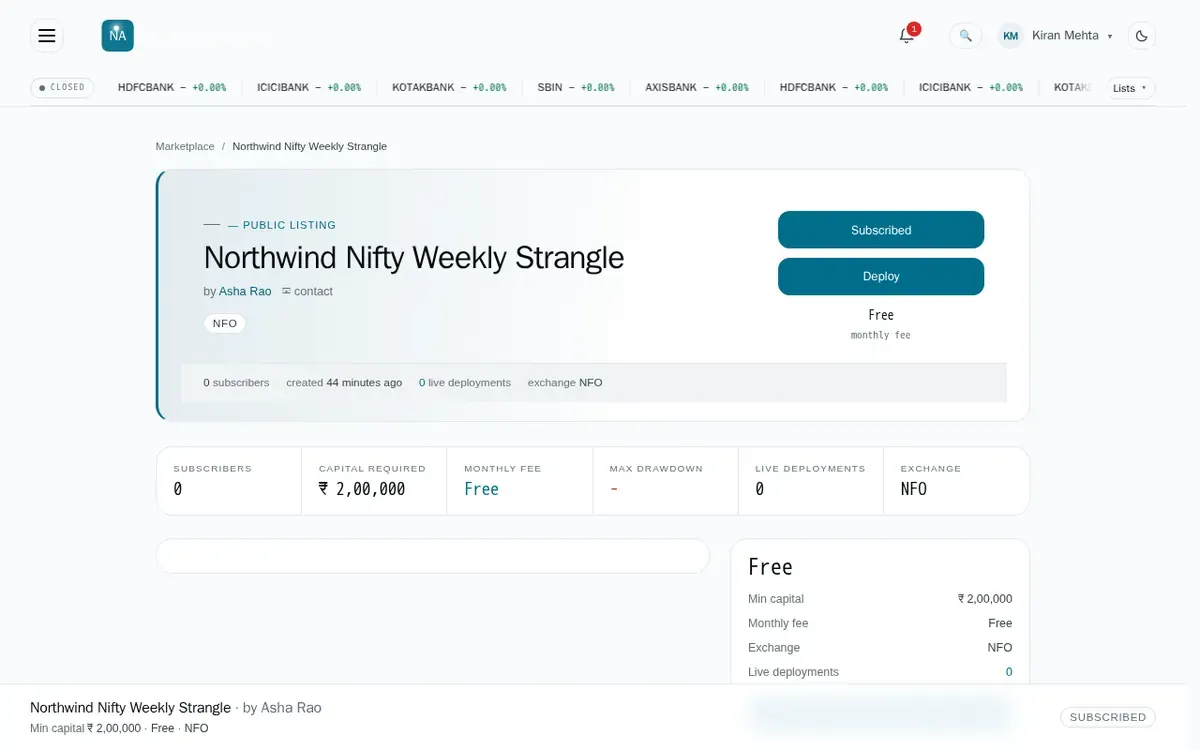
Your strategies are the product. Clients browse them, see capital, fees and figures computed by the platform, subscribe and deploy, all under your brand.

  • Your public Tradetron strategies are listed for you, by reference, never copied
  • Choose which private strategies to list
  • Show creator names, performance figures and a Live Offline showcase
  • Set your own price per strategy

Included from day one

A strategy page on a partner site: title, creator, capital required, monthly fee and Subscribed and Deploy buttons.
A listed strategy on a partner’s client app (demo brand “Northwind Algo Desk”). Captured 3 Oct 2026.

04 · BACKTESTS

Fast backtests, at the price you set

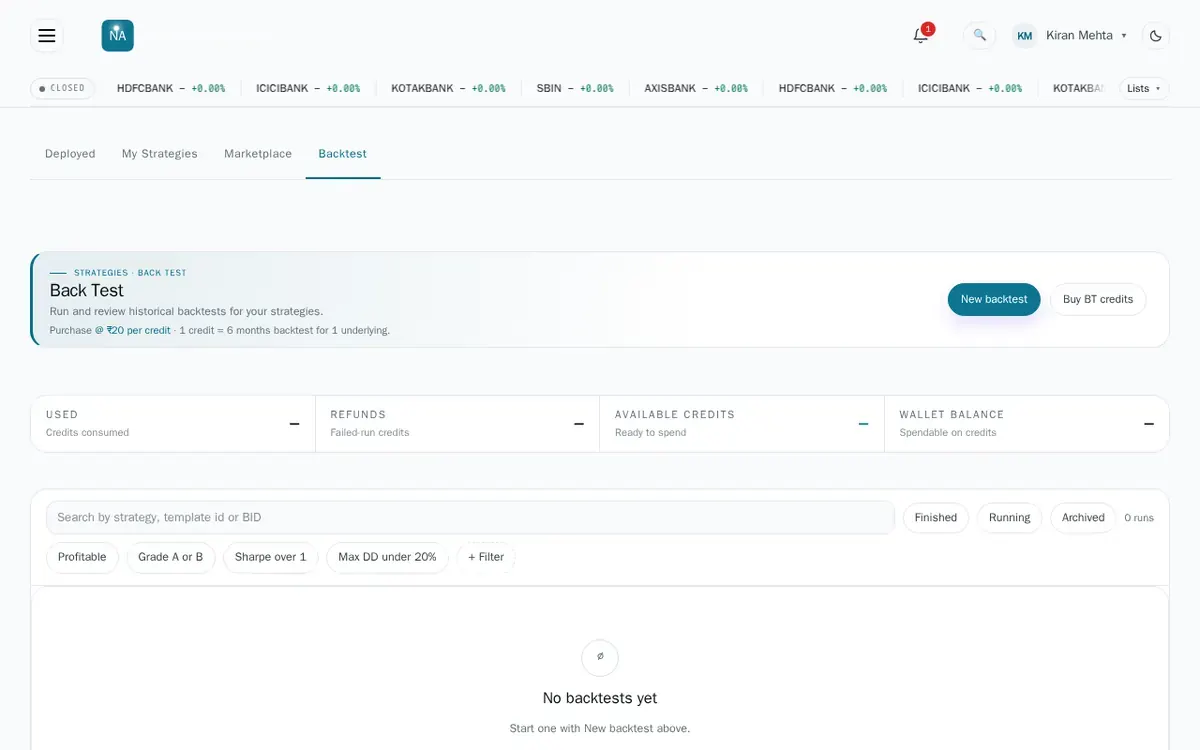
Testing on past data is what makes a client trust a strategy, and you decide what it costs them. Backtests run on Tradetron’s own backtest engine (FastBT), the one tradetron.tech uses.

  • Clients test any strategy on past market data before running it
  • You set the price per backtest credit in the Studio
  • Until you set a price, backtests on your site are free
  • Compare runs and filter by results

Included from day one

The Backtest page of a partner’s client app: credits used, refunds, available credits, wallet balance, filters and a New backtest button.
The Backtest page on a partner’s client app (demo brand), before the client’s first backtest. Captured 3 Oct 2026.

05 · BROKERS

Full broker connections

Clients trade on the broker account they already have, so you never hold their money. They add, connect and edit their brokers on your site, the same way tradetron.tech users do.

  • Add and connect the brokers Tradetron supports
  • India: 200+ broker connections across NSE, BSE and MCX
  • Lock your platform to one broker if you are a broker
  • A few brokers that sign in through the broker’s own page follow later

Included from day one

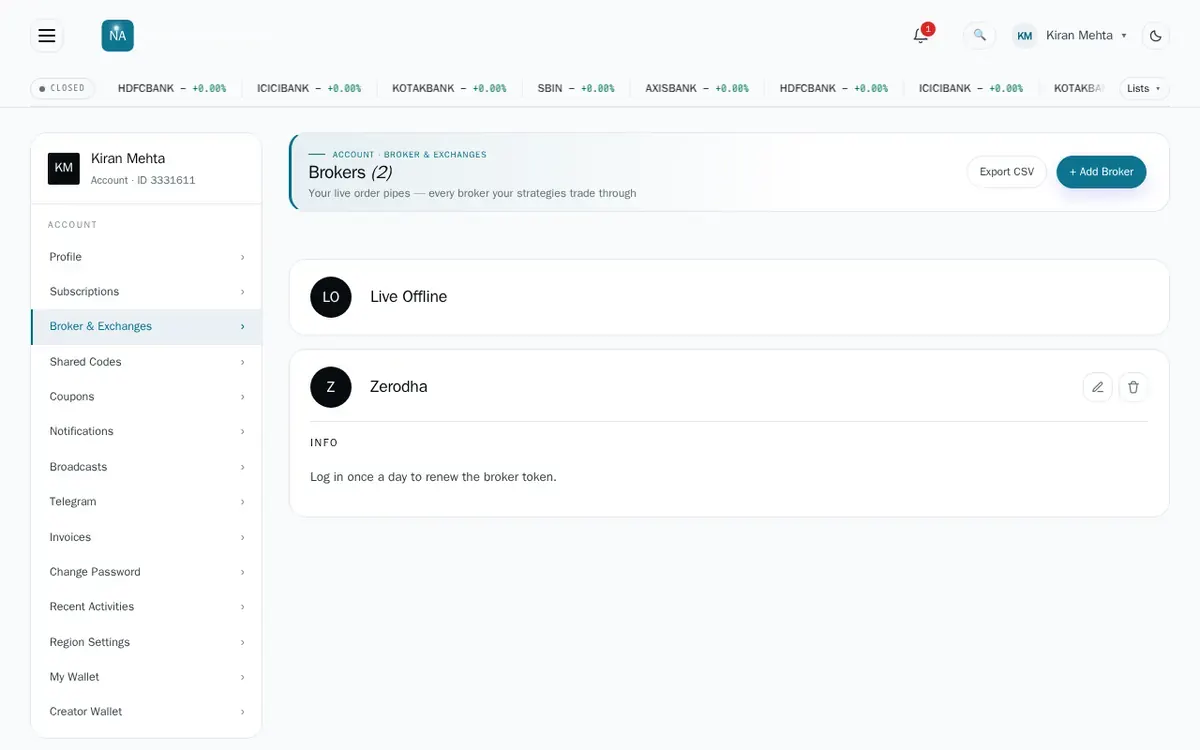
The Brokers page of a partner’s client app: Live Offline and a Zerodha connection, with Add Broker.
The Brokers page on a partner’s client app (demo brand). Captured 3 Oct 2026.

06 · TRADING

Live Auto, one-click confirm and Live Offline

Your clients can go from idea to real orders on your platform. Live Auto sends orders to their own broker by itself; one-click asks them to confirm each order; Live Offline records every trade without sending anything to the exchange.

  • Live Auto on the client’s own broker, included in your free trial
  • Clients move a running strategy between automatic and one-click
  • Live Offline to try a strategy on a real broker account first
  • Exit all, change size, and set what happens after an order error

Included from day one

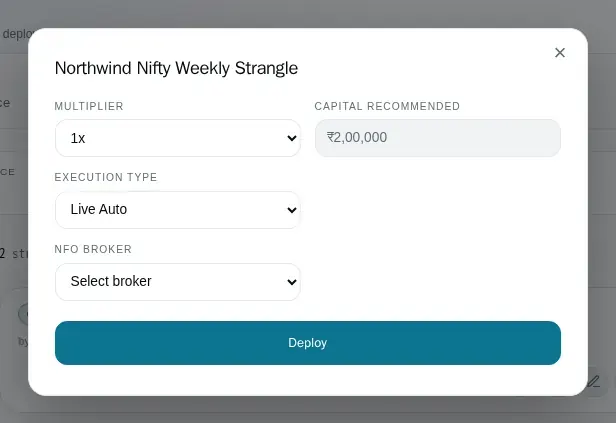
The deploy dialog with multiplier, recommended capital, execution type Live Auto and the broker to use.
Deploying a strategy with execution type Live Auto on a partner’s client app (demo brand). Captured 3 Oct 2026.

07 · AI

Clients bring their own AI

Your clients already use AI assistants. They will connect Claude, ChatGPT or any assistant that supports MCP to their own account on your platform, and build, explain and check strategies in plain words. They use their own AI account, so there is no AI bill for you.

  • Clients connect their own AI assistant to their account on your platform
  • Build a strategy from a description, in plain words
  • Ask why a strategy did or did not trade, and check it before running it
  • No AI bill for you: clients use their own AI account

Coming soon

“Build me a Bank Nifty straddle that exits at 2% loss, then backtest it for the last year.”Clients ask their own AI assistant in plain words; it works on their account on your platform.

08 · PAYMENTS

Your own payment gateway. No revenue share.

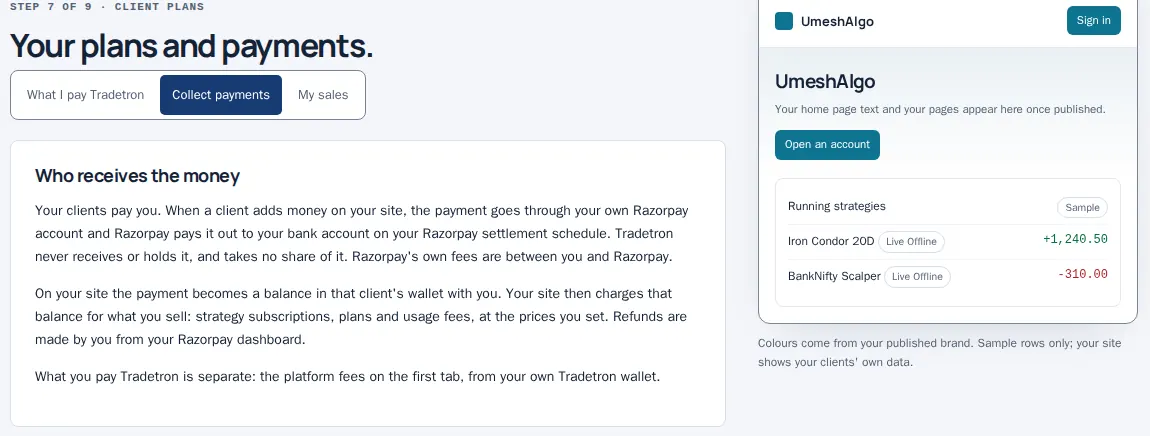
Clients pay you, not us. Their payments for your plans and strategy subscriptions go straight to your own Razorpay account and out to your bank. Tradetron never holds that money and takes no share of it.

  • Link your own Razorpay account and switch client payments on yourself in the Studio, with no approval
  • Sell strategy subscriptions, one plan, or a fee per running strategy, with coupons
  • Download your sales any time
  • Tradetron bills you only its platform fees, from your own wallet

You switch it on, no approval

During the trial checkout runs on Razorpay test keys, so no real money moves. Real payments use your live Razorpay keys after you go live.

The Studio’s plans and payments screen: Who receives the money, explaining that client payments go through the partner’s own Razorpay account.
Partner Studio, plans and payments. Captured 3 Oct 2026 on a practice account, before the Studio’s redesign.

09 · GROWTH

Your own affiliate program

Let other people sell for you. Promoters bring clients to your site and earn a commission on what those clients pay.

  • Set the commission and for how many months of a client’s payments it runs
  • Choose your program admins and payout terms
  • Try the program before you add your payer details; payouts start once you do
  • Affiliates sign up, share links and follow their earnings on a portal in your brand

Set up in the Studio today Affiliate portals are rolling out

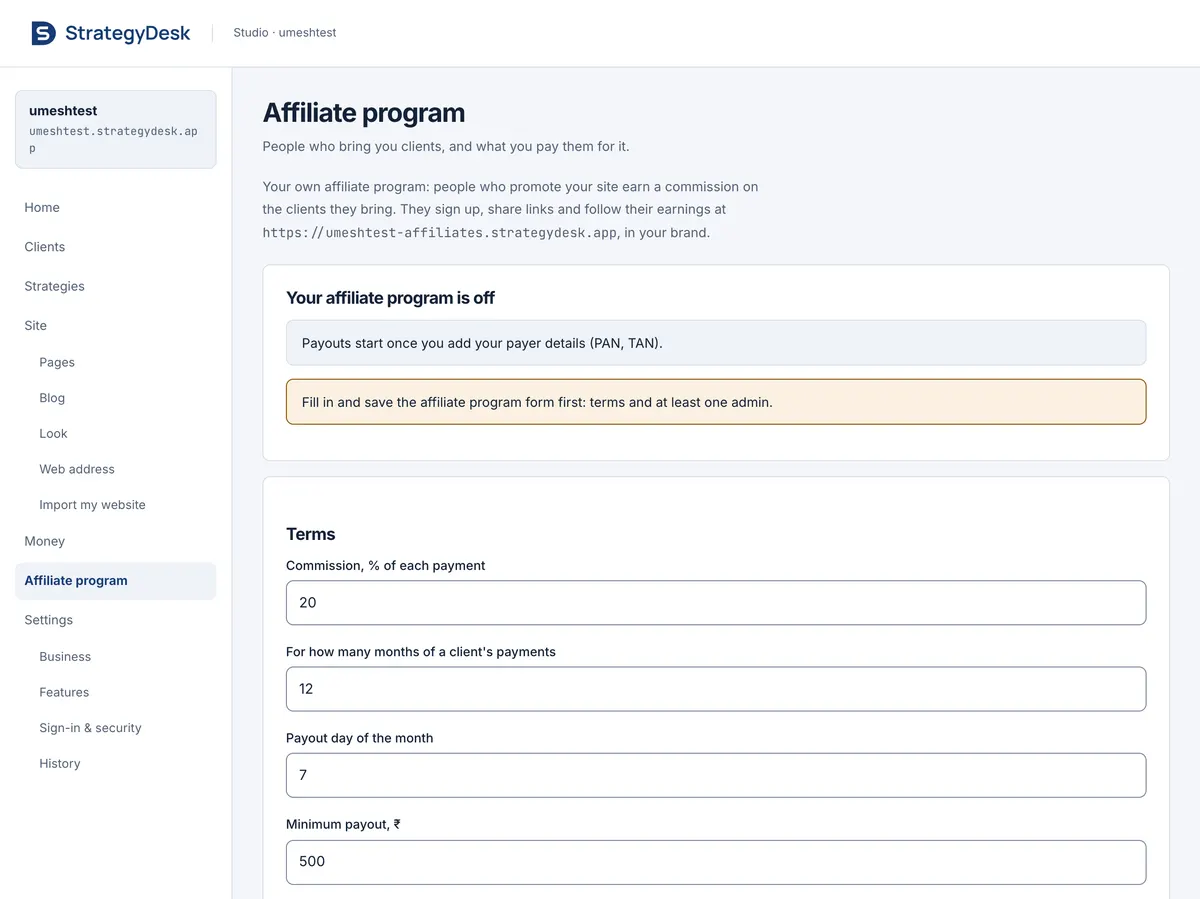
The Studio’s Affiliate program screen: your affiliate address, commission percent, months, payout day and minimum payout.
Partner Studio, Affiliate program. Captured 4 Oct 2026 from a live trial Studio.

10 · CONTENT

A blog, with publishing from Claude Code

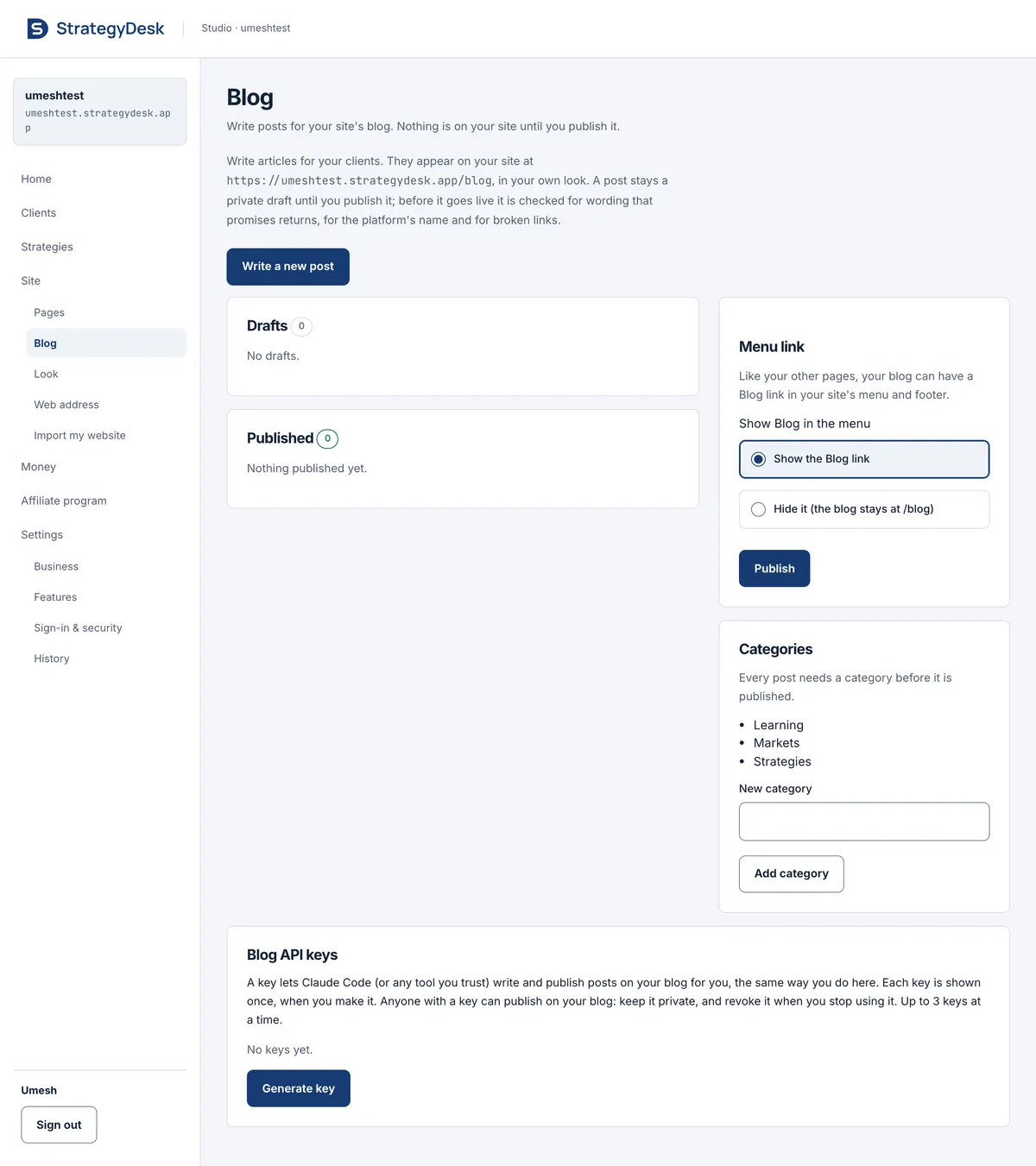
Articles bring visitors from search and keep clients coming back. Write in the Studio, or generate a Blog API key and let Claude Code draft posts for you. You see every draft first; it publishes only when you say so.

  • Posts at /blog on your site, in your own look, with categories
  • Draft, preview and publish from the Studio
  • Blog API keys for Claude Code or another AI tool
  • Every post is checked for promised returns and broken links before it goes live

Included from day one

The Studio’s Blog screen: write a new post, drafts and published lists, menu link, categories and Blog API keys for Claude Code.
Partner Studio, Blog with Blog API keys. Captured 4 Oct 2026 from a live trial Studio.

11 · EDUCATION

Learning pages and webinars

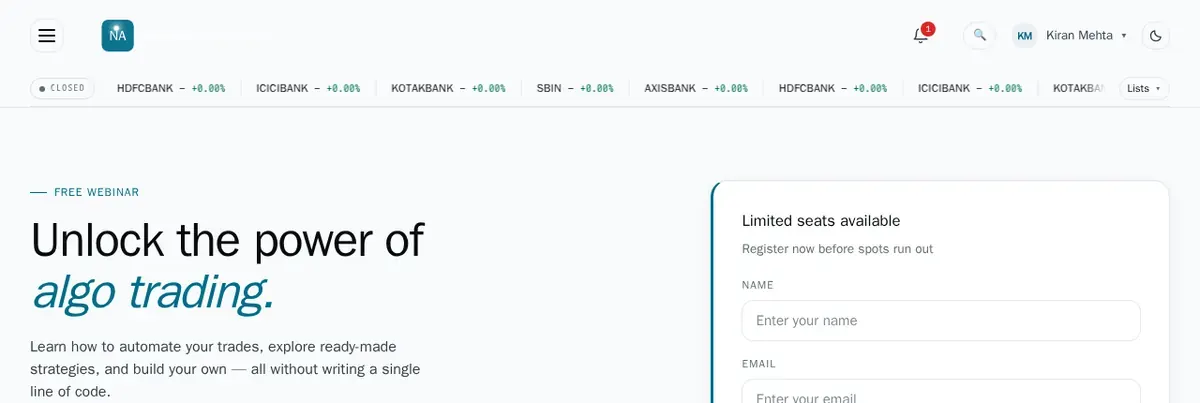
If you teach, your platform is your classroom. Lessons and webinars sit next to the strategies your students practise, under your brand.

  • Learning pages with your lessons
  • Webinar pages with seat booking
  • Your own pages for anything else you want to publish

Included from day one Coming soon: video courses

A free webinar page in the partner’s name, with a seat booking form.
A webinar page on a partner’s client app (demo brand). Captured 3 Oct 2026.

12 · BACK OFFICE

A back office for you and your team

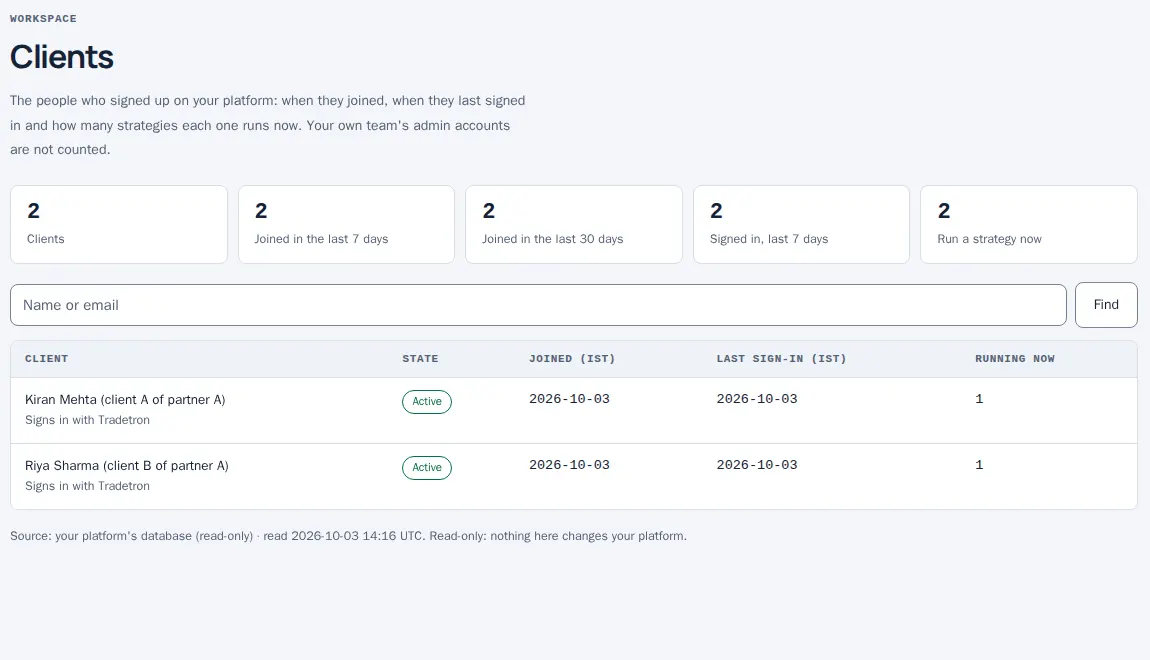
When a client calls, you need answers fast. The Studio shows who signed up, when they last signed in, and every strategy running on your platform right now.

  • Find any client by name or email
  • See new sign-ups and active clients at a glance
  • The Live desk lists every running strategy, its mode and state
  • Strategies that stop on an error are flagged for attention

Included from day one Coming soon: a support console with client actions, and inviting colleagues with roles

The Studio’s Clients screen: counts of clients, recent sign-ups and sign-ins, a search box and a table of clients.
Partner Studio, Clients screen with two test clients. Captured 3 Oct 2026 on a practice account, before the Studio’s redesign.

13 · SET-UP

Import from your existing website

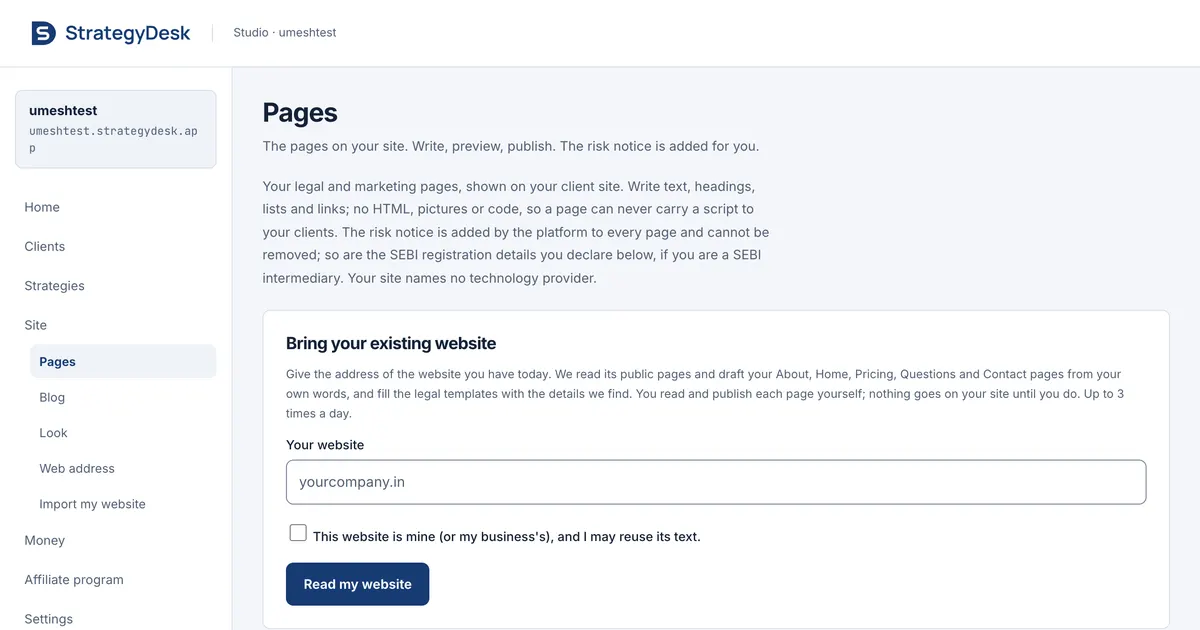
Already have a website? Give the Studio its address. It reads your site and drafts every page of your new platform for you: home, about, services, pricing, questions and contact. You review the drafts and publish.

  • One step: enter your site’s address
  • Drafts for all your main pages, written from your own content
  • Legal pages start from templates filled with the facts found on your site
  • Nothing is published until you publish it

Included from day one

The Studio’s Pages screen with Bring your existing website: enter your address and the Studio drafts your pages.
Partner Studio, Pages: import from your existing website. Captured 4 Oct 2026 from a live trial Studio.

14 · ADDRESS

Your own domain

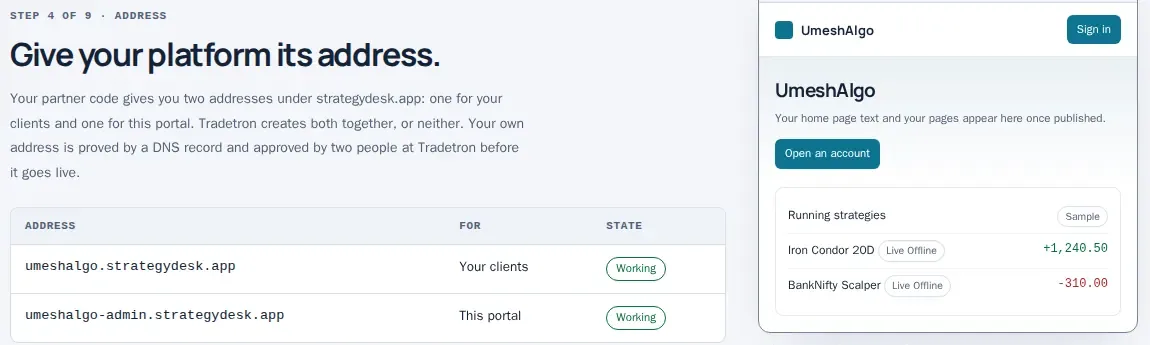
Your clients should type your name, not ours. Start on yourname.strategydesk.app the day you sign up. Connecting your own domain is not available yet.

  • Two addresses from day one: one for clients, one for your Studio
  • Your clients and your Studio stay on those addresses for now
  • The Address screen already has the guide, with your exact DNS records, for when it opens

Two addresses: on from day one Your own domain: not available yet

The Studio’s Address screen: the client address and the portal address, both working.
Partner Studio, Address screen. Captured 3 Oct 2026 on a practice account, before the Studio’s redesign.

SET UP IN AN AFTERNOON

From almost nothing
to a live platform.

You give us very little. The platform fills in the rest, and you change anything you like later.

Sign up

Your email and a one-time code, or Sign in with Tradetron. Choose your partner code; your trial starts straight away.

Name and logo

Add your business name and logo and pick a theme. Your whole site takes your look.

Your site is live

Both addresses work, with starting pages and your strategies listed. Already have a website? Import it.

Decide what your clients get

Most features are on. Switch any of them on or off to fit your business, publish your legal pages, invite your clients.

EIGHT STARTING POINTS. YOUR IDENTITY.

A platform that feels like you.

An in-browser preview of the eight theme presets with a sample brand and illustrative figures. In the Studio you also upload your logo and fine-tune colours, fonts and corners.

PRICING

Start a technology business
without building the technology.

Try it free for 15 days with most features on. After that you pay a one-time setup fee and a small daily fee for each running strategy. There is no retainer and no revenue share: what your clients pay you is yours.

First 15 days: free trial

  • Setup feenone
  • Running feenone during the trial
  • Featuresmost on, Live Auto included
  • Clients / strategiesup to 50 / 20

The ₹15 per running strategy per day starts only when you convert. Reminders come on days 10 and 13. If you have not converted by day 16, the platform pauses: read-only, with nothing deleted. Paying the setup fee turns the same platform into your live one.

A CLEAR FOUNDATION

Your business.
Tradetron’s engine underneath.

StrategyDesk is the technology and whitelabel partner of Tradetron. We build and run the technology; you run the business.

Your decisions, no tickets

Product features are yours to switch, and so are client payments: link your own Razorpay and switch them on, with no approval. Live keys come after go-live.

Your clients stay yours

You own the client relationship. Your clients use your brand, your address, and pay you through your own payment account.

Markets. Clients connect the broker account they already have, so what they can trade depends on their broker. India: 200+ broker connections covering NSE, BSE and MCX. United States: 8 brokerages covering NYSE, Nasdaq and Cboe listings. Crypto: 7 exchange connections. Counts from Tradetron’s broker catalogue on 30 September 2026.

QUESTIONS, ANSWERED

A few things
worth knowing.

Need to talk it through?
Get in touch with us.

Is every feature on from day one?

Most are. Every feature is included, and most are switched on for your clients when your trial starts. In the Studio’s Features screen you switch any of them on or off, or a whole category, yourself; nobody at Tradetron approves it. Client payments start off: you switch them on yourself once your own Razorpay is linked, also without approval. Real money moves on your live keys after go-live.

What does the free trial include?

15 days, free, with most features on, Live Auto included: clients can run strategies that send real orders to their own broker accounts. There is no setup fee and no running fee during the trial. It covers up to 50 clients and 20 running strategies. No client is charged during the trial.

What do I pay after the trial?

₹2,50,000 one-time setup, then ₹15 per running strategy per day, plus GST. The running fee starts only when you convert. AI use is billed at the provider’s price and backtests by use, from your wallet. There is no share of your revenue.

Who receives my clients’ payments?

You do. Your clients pay for your plans and strategy subscriptions through your own Razorpay account, which pays out to your bank. Tradetron never holds that money and takes no share of it; it bills you only its platform fees.

What happens to test balances when I convert?

Balances made with test payments during the trial are discarded: client wallets start at zero on your live payment keys. The Studio shows you this before you convert.

Do you review my pages before they go live?

No. You publish your pages and brand yourself. An automatic check flags wording such as promised returns, but it does not hold your publish. We never publish legal pages (terms, privacy, refund, disclaimer) for you, because they bind your business: the Studio gives you templates and you publish them.

Which addresses do I get?

Your partner code gives you two addresses under strategydesk.app, one for your clients and one for your Studio. Connecting your own domain is not available yet; the Studio’s Address screen has the guide for when it opens.

I already have a Tradetron whitelabel. What should I do?

Nothing yet. Your current site is not touched. You will get the new platform on its own strategydesk.app address to try with your team and clients, and it takes over only when you point your own address at it.

Who owns the client relationship?

You do. Your clients sign up on your site and you set their plans. Write to support@strategydesk.app for an export of your client list at any time.

How is StrategyDesk related to Tradetron?

StrategyDesk is Tradetron’s partner platform. Your site runs on technology provided by Tradetron (Neutrino Trading Private Limited). You offer the services on your site; Tradetron does not offer, recommend or manage any strategy there.


LET’S TALK

Tell us what
you’re building.

Ask a question, request a demo or start a trial (or use Start free trial above). Write with your business name, your market (India, the US or both) and roughly how many clients you expect. A person will reply.

Writing to us does not create an account or start a trial.

EMAIL

support@strategydesk.app

Write to us

Already a Tradetron whitelabel partner? Use the same address and mention your current site.